
Decode Your Windows Crash Screen
Professional AI-powered analysis for all Windows crashes - whether you see a blue screen, black screen (Windows 11 Build 22000.346+), green screen (Insider builds), or system freeze. Get instant insights into what caused your crash and how to fix it.
Why Choose BSOD AI Analyzer?
Advanced AI technology meets Windows debugging expertise
Easy Upload
Simply drag and drop dump files or .zip, .7z, and .rar archives. Supports minidumps, kernel dumps, and complete dumps.
AI-Powered Analysis
Our AI analyzes crash patterns, driver conflicts, and system states to pinpoint the exact cause of your BSOD.
Clear Solutions
Get step-by-step instructions to resolve your specific issue, from driver updates to system configuration changes.
See the Difference
Compare our user-friendly analysis with traditional debugging tools
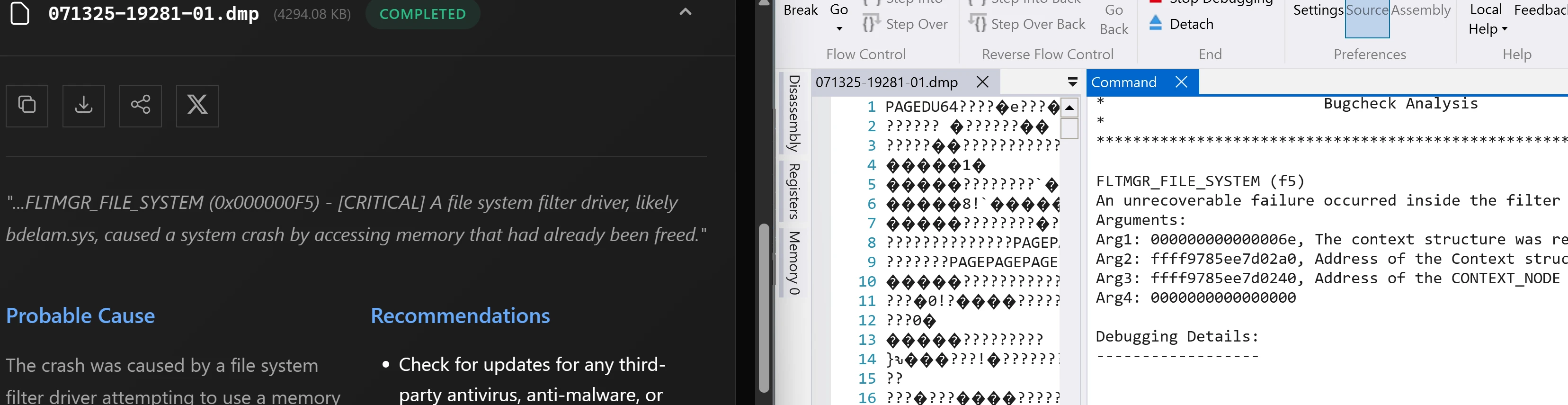
✅ BSOD Analyzer
- Plain English explanations
- Instant root cause identification
- Actionable recommendations
- No technical expertise required
- Clean, modern interface
❌ Traditional Debuggers
- Complex hex dumps
- Requires kernel debugging knowledge
- Technical jargon and memory addresses
- Steep learning curve
- Command-line interface
Same crash dump, different experience: While WinDbg shows raw memory addresses and hex values, BSOD Analyzer tells you exactly what happened and how to fix it. Works with both classic blue and modern black crash screens.
Understanding Windows Crash Screens
Not all crashes show a blue screen! Depending on your Windows version and settings, you might encounter different types of critical error screens:
- 🔵 Blue Screen (BSOD) - The classic crash screen in Windows 10 and earlier versions
- ⚫ Black Screen - Starting with Windows 11 Build 22000.346 and later, the crash screen is black instead of blue, often followed by automatic repair attempts
- 🟢 Green Screen (GSOD) - If you've ever enrolled in Windows Insider Preview builds, crashes display a green screen to differentiate beta issues from regular system crashes
- ❄️ System Freeze - Sometimes Windows completely freezes without showing any error screen. The system becomes unresponsive but no crash screen appears
All these scenarios generate crash dump files that our analyzer can process, regardless of the screen color or whether a screen appeared at all.
How Our Analysis Works
Our AI-powered analyzer examines your crash dump files to identify:
- The specific error code and its meaning
- Which driver or system component caused the crash
- The exact sequence of events leading to the failure
- Potential hardware or software conflicts
Using advanced pattern recognition, we provide targeted solutions based on millions of analyzed crash scenarios.
Watch the whole pipeline, step by step - an animated walkthrough from blue screen to finished report.
Additional Resources
For more information about Windows crashes and troubleshooting:
- Microsoft Support: Troubleshooting Windows unexpected restarts and stop code errors - Official guide from Microsoft covering common causes and solutions
- BSOD AI Analyzer Documentation - Learn how to use our tool effectively